
Writing inject templates
Inject templates turn the structured fields of an inject (a tweet’s handle and text, a ticket’s number and description, a FIDS board’s rows) into a PNG and, for paper injects, a PDF page. Every text-bearing inject is rendered from a template so its text is exact and legible; AI image models are only used for photographic scenes, which a template can then frame (CONTRIBUTING.md, Project rules 5).
This guide covers the folder contract, the day-to-day loop, golden images, and adding a new inject type end to end. The reference implementation is templates/injects/time_jump_card/ (simple, paper) and templates/injects/tweet/ (variants, image slots). The design decisions are in ADR-0008; the inject types are listed in docs/03-INJECT-TAXONOMY.md.
Folder contract
Section titled “Folder contract”A template is one folder, templates/injects/<type>/, where <type> is the inject type id ([a-z0-9_]+, the same id as in src/shared/taxonomy.ts).
| File | Required | Purpose |
|---|---|---|
meta.json |
yes | Type, label, version, size, paper flag, variants, background, image slots. |
schema.json |
yes | JSON Schema (draft 2020-12) for the inject’s fields. The model fills fields against it. |
preview.json |
yes | Realistic sample data. The Templates page and the golden tests render it. |
template.html |
yes | Handlebars body. No <html>, <head> or scripts; the composer wraps it. |
style.css |
yes | Styles for this template, layered on templates/_shared/base.css. |
__golden__/<variant>.png |
yes | Approved 2× render of preview.json per variant (default.png when there are no variants). |
| sample images | no | Files referenced by preview.json assets (for example sample-photo.jpg). |
meta.json
Section titled “meta.json”{ "type": "tweet", "label": "Social post (X-style)", "version": "1", "width": 598, "paper": false, "variants": ["light", "dark"], "background": "#ffffff", "imageSlots": ["attached_image", "avatar"]}| Key | Meaning |
|---|---|
type |
Must equal the folder name, or loading fails with meta.json type "…" ≠ folder "…". |
label |
Name shown on the Templates page. |
version |
String. Recorded in every rendered asset’s provenance (templateVersion). Bump it when the layout or fields change. |
width |
CSS pixel width of the inject. The PNG is twice this (renders run at 2×). |
height |
Optional fixed height. Omit it and the render is sized to the content (social posts, tickets). |
paper |
true for printed injects (memos, slips, letters, control cards): they also export a PDF page. |
variants |
Named looks of the same data, for example ["light", "dark"]. Empty means one default variant. |
background |
Colour behind the inject (the app chrome around a screenshot). |
imageSlots |
Names of places an AI image can be composited into (see Image slots). |
Which domains a type belongs to is set in the inject taxonomy (src/shared/taxonomy.ts, domains: ['airport']), not in meta.json. An untagged type is offered to every domain. The Templates page has a Domain filter (chips for every domain profile, including those of installed packs, plus All domains): a domain shows the untagged templates plus those tagged for it, and tagged cards carry a badge such as Airport only. Opened while a project is open, the page starts on that project’s domain.
schema.json
Section titled “schema.json”JSON Schema 2020-12 for fields, with "additionalProperties": false. Rendering validates fields against it (VALIDATION lists every issue) and the inject_text generation stage sends a summary of it to the model, one line per property:
- newTime (string, required) — Wall-clock time players jump to — e.g. "10:00 AM"That line is built from the property name, type, required, description and the first of examples. Write descriptions and examples for the model as much as for people: they are how a local model learns that a flight number is SX1245 and not Skyline flight 1245. Keep the fields the facilitator needs to read aloud or hand over; leave layout decisions to the template.
preview.json
Section titled “preview.json”{ "fields": { "...": "..." }, "variant": "light", "assets": { "attached_image": "sample-photo.jpg" }}fields must validate against schema.json. Use realistic, specific sample data (the Scenario 3 material in reference/scenario-3/ is a good source); the preview is what reviewers see on the Templates page and what the golden image is made from. assets maps image slots to files inside the template folder.
A template with variants can give a variant its own sample data, so each golden shows content that fits it (a vendor advisory from a vendor, a planned downtime notice with a scheduled window). variants.<name>.fields replaces those top-level fields of fields when that variant is previewed; the merged fields must validate too, and the variant must be listed in meta.json:
{ "variant": "agency", "fields": { "publisher": "Cybersecurity and Infrastructure Security Agency", "...": "..." }, "variants": { "vendor": { "fields": { "publisher": "Halyard Networks PSIRT", "iocs": [] } } }}Writing template.html
Section titled “Writing template.html”The template is a Handlebars body. The composer wraps it in a full document:
<body class="variant-<variant>"> <main class="inject-root inject-<type>" style="width:<width>px; height:<height>px"> <!-- your template.html --> </main></body>The context has these keys (derived is empty for most types, see Derived values):
| Key | Contents |
|---|---|
fields |
The inject’s fields (validated against schema.json). |
brand |
The project’s brand: city, region, primaryColor, logo (see Project logo), and aliases (see Brand aliases). |
variant |
The variant being rendered (also available as the variant-<name> class on <body>). |
assets |
slot → URL of AI images for this inject’s image slots (empty when there are none). |
Escaping is on. Field values are untrusted model output, so {{fields.text}} is HTML-escaped. Never use triple-stash {{{ }}}. The helpers that output markup (nl2br, social) escape their input first.
Helpers
Section titled “Helpers”| Helper | Usage | Result |
|---|---|---|
eq, ne |
{{#if (eq fields.avatarStyle 'initials')}} |
Strict equality / inequality. |
and, or, not |
{{#if (and fields.a fields.b)}} |
Boolean logic over any number of values. |
gt |
{{#if (gt fields.metrics.likes 1000)}} |
Numeric greater-than. |
inc |
{{inc @index}} |
Adds one (1-based numbering in {{#each}}). |
default |
{{default fields.workspace 'Team'}} |
Fallback when the value is missing, null or empty text. |
upper, lower |
{{upper fields.status}} |
Case conversion. |
compact |
{{compact fields.metrics.views}} |
12400 → 12.4K. Strings pass through. |
clock |
{{clock fields.durationSec}} |
83 → 1:23. Strings pass through. |
initials |
{{initials fields.displayName}} |
Karen Smith → KS (skips words starting with punctuation). |
nl2br |
{{nl2br fields.narration}} |
Escapes, then turns newlines into <br>. |
social |
{{social fields.text}} |
Escapes, highlights #hashtags and @mentions as <span class="link">, keeps line breaks. |
join |
{{join fields.tags ', '}} |
Joins a list. |
json |
{{json fields}} |
JSON text (debugging). |
times |
{{#times 5}}…{{/times}} |
Repeats a block, with @index. |
t |
{{t 'what_to_do' 'What should I do?'}} |
Template chrome in the document language (see Translation); the English text when no label. |
Built-in Handlebars blocks ({{#if}}, {{#unless}}, {{#each}}, {{#with}}, {{else if}}) work as usual.
Translation
Section titled “Translation”Players can get an inject in Spanish (guide). Three things make a template ready for it.
- Say what must not be translated. The app translates only string fields that read as language. A field is kept exactly as written when its schema has
enum,const,pattern,format, amaxLengthof 8 or less, or"x-translate": false. Mark identifiers, handles, codes, phone numbers, URLs, times, proper names and image briefs with"x-translate": false({ "type": "string", "x-translate": false }); the template checker ignores unknown schema keywords, so nothing else changes. A field a person reads as part of the message needs no mark. - Translate the chrome with
labels/<lang>.json. Put static words (“What should I do?”, “Reply”) through{{t 'key' 'English text'}}(or{{t 'English text'}}, which uses the text as the key) and addlabels/es.jsonbesidetemplate.html: a flat map of key to string, 64 KB at most, one file per language code. Thethelper falls back to the English written in the call, so a template withoutlabels/es.jsonrenders its Spanish field text in English chrome. The checker refuses a labels file that is not a flat string map. langis set for you. A render for a language putslang="es"on<html>and on the inject root, and the inject’s title in<title>.
Derived values
Section titled “Derived values”Some strings must be exact and are computed, not written: a SAME header, VTEC and UGC lines, CAP times and XML, an ICAO Q line. Templates cannot compute them, so the app does it in main before rendering (src/main/render/derived/, one module per inject type) and gives the template a fifth context key, derived, beside fields (it never replaces a field). Write {{derived.sameHeader}}, not your own formatting. Types with derived values: cap_alert, eas_broadcast, nws_weather_warning, notam. A pack template of the same type gets the same data; packs cannot add derivation code.
Styles, fonts and the sandbox
Section titled “Styles, fonts and the sandbox”Templates render in a sandboxed, offscreen window with no network and no scripts. The document’s Content Security Policy allows only inline styles, file: and data: images, and file:/data: fonts.
templates/_shared/base.cssresets margins, setsbox-sizing, and defaults to Inter. Build on it instyle.css.- Fonts come only from
templates/_shared/fonts.css: Inter, Roboto, Roboto Condensed, JetBrains Mono, Source Serif 4, Courier Prime and Caveat (handwriting). The files are copied from@fontsourcepackages bynode scripts/sync-template-fonts.mjsand committed, so renders are identical offline and in packaged builds. To add a family, add it to that script, run it, and commit the generatedfonts.cssand font files. - Draw icons and logos as inline SVG. Do not reference remote images, web fonts or real company logos.
- Style variants with
body.variant-<name> .your-class { … }(seetemplates/injects/tweet/style.css).
Paper sizing
Section titled “Paper sizing”Paper injects are US Letter at 96 dpi: "width": 816, "height": 1056, "paper": true. Lay the page out inside that box (the time jump card uses height: 1056px; padding: 72px 80px). The PNG is 1632 × 2112; the PDF is one Letter page. Screen injects (posts, dialogs, boards) set only width unless they imitate a fixed-size screen.
Forms longer than one page
Section titled “Forms longer than one page”A form whose lists can outgrow a page (the chain of custody form’s transfers, the regulatory report’s sections) omits height and prints one <section class="page"> per Letter page, each height: 1056px with break-after: page. The PNG is then the pages stacked (1632 × 2112 per page) and the PDF has one Letter page per section. Templates cannot measure text, so two helpers split the lists by estimated height (src/main/render/paginate.ts):
{{#each (paginate (rows @root.fields.transfers key='transfers' heading=82 min=38 line=14.3 pad=10 wrap='purpose:36' keep=true ) (rows @root.fields.notes key='notes' heading=42 line=15.5 wrap='104') first=780 rest=880 )}} <section class='page'>… {{#each groups}}{{#if (eq key 'transfers')}}{{#each rows}}{{number}} {{item.purpose}}{{/each}}{{/if}}{{/each}} Page {{number}} of {{total}}</section>{{/each}}rows turns a list (or a text, split into paragraphs) into a row group: each row costs max(min, pad + line × wrapped lines) pixels, the wrapped lines estimated from the longest field:characters-per-line in wrap; heading is charged on every page the group starts on, nested="items" makes one group per section, keep=true prints the group even when empty. paginate packs the groups into pages of first (page 1) and rest pixels, repeats a split group with continued set and continues on the page before, and never starts a group with fewer than two rows at the bottom of a page. Inside the block, first, last, number and total describe the page and the fields are at @root.fields. Keep the budgets a little under the real space: rows that wrap less than estimated leave white space, rows that wrap more are clipped.
Brand aliases
Section titled “Brand aliases”Templates should read like the organization in the project, without hard-coding it. A project’s Overview page has a brand section (city, region, primary colour) and an aliases editor. Templates read these aliases:
| Alias | Meaning | Example |
|---|---|---|
brand.aliases.org |
Full organization name | North Coast Regional Airport Authority |
brand.aliases.orgShort |
Short name or acronym | NCIA |
brand.aliases.orgDomain |
Email / web domain | ncia.example |
brand.aliases.localTv |
Local TV station | Channel 5 |
brand.aliases.airport |
Site name on system screens (CCTV, BHS, FIDS) | North Coast International |
Rules: a field value always wins over an alias, and every alias needs a generic fallback, for example:
{{#if brand.aliases.orgShort}}{{brand.aliases.orgShort}}{{else}}IT Service Management{{/if}}Project logo
Section titled “Project logo”brand.logo is a file: URL of the project’s logo (set in project settings, stored as brand.logoPath), or absent. It is the organization’s own mark, so use it only where the inject comes from the exercise organization, and keep the generic emblem as the fallback so renders without a logo (and the goldens) stay the same:
{{#if brand.logo}}<img class='logo' src='{{brand.logo}}' alt='' />{{else}}<svg class='emblem' >…</svg>{{/if}}memo, press_release and sitrep show it in their letterhead; official_letter shows it only when letterhead.fromProject is true (a letter from an agency or insurer keeps its own seal or monogram). The export’s Exercise Plan cover shows it above the organization name.
Image slots
Section titled “Image slots”A slot is a named place for an AI-generated photo inside a templated inject (the photo attached to a post, the camera frame of a CCTV still). Declare it in meta.json imageSlots and show it only when present:
{{#if assets.attached_image}} <img src='{{assets.attached_image}}' alt='{{fields.attachedImageAlt}}' />{{/if}}At generation time the media stage stores the image as an asset whose id starts with the slot name (attached_image-01J…); the renderer fills the slot from it and marks the result as a composite. A template with exactly one slot also accepts an unprefixed image. Never put text that matters into a slot image; image models render garbled text.
The authoring loop
Section titled “The authoring loop”-
Look at it in the app.
pnpm dev, then Templates in the sidebar. The gallery renders every template’spreview.jsonand lists its fields and variants. Templates are re-read whenever a file in their folder changes, so reopening a template shows your edits.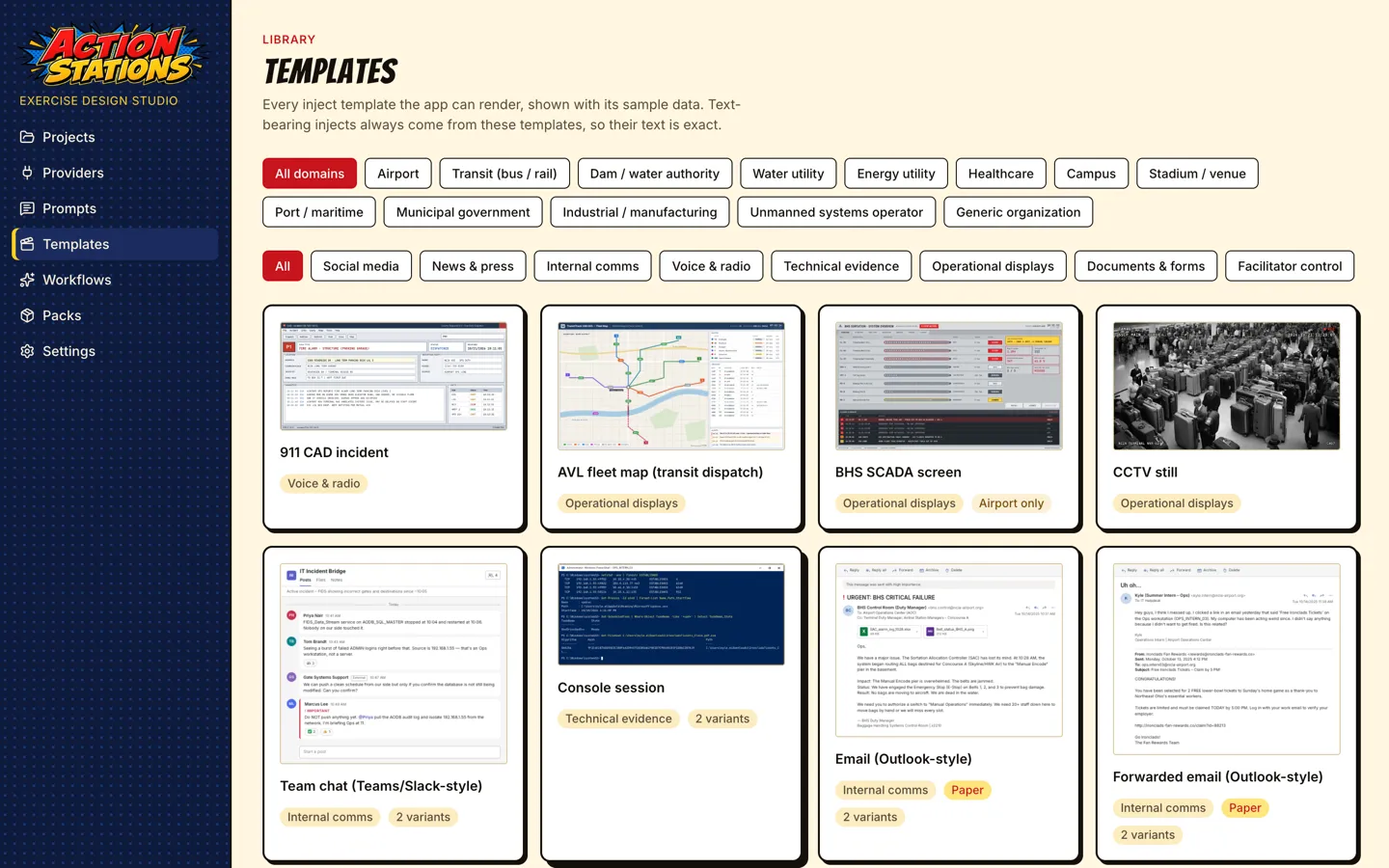
-
Render through the real pipeline.
Terminal window pnpm build:apppnpm test:templatestest:templatesruns two Playwright specs against the built app:e2e/templates-preview.spec.tswritestest-results/templates/<type>[--<variant>].pngfor every template and checks the render pool (concurrency, crash recovery).e2e/templates-golden.spec.tscompares every template × variant with its golden PNG (below).
Open the PNGs right after the run: Playwright empties
test-results/at the start of every run. -
Check the generated version. To see what a model makes of your schema, generate injects for a scenario (
generate:injects, used by the live inject testLIVE=1 pnpm test -- tests/live/injects.live.test.ts) and read the rendered pages under<project>/scenarios/<id>/media/.
Goldens and determinism
Section titled “Goldens and determinism”Each template × variant has a committed golden: templates/injects/<type>/__golden__/<variant>.png, a 2× render of preview.json. The golden test:
- renders the preview twice and fails if the two renders differ by more than 0.01 % of pixels (GPU anti-aliasing can move a few pixels between pooled windows, so byte equality is not required);
- compares the render with the golden using pixelmatch (threshold 0.1, at most 0.1 % differing pixels);
- on a mismatch or a missing golden, writes
.tmp/golden-diff/<type>--<variant>.actual.png(and.diff.pngfor a mismatch).
Creating or updating a golden:
- New template or new variant: run
pnpm test:templates. The test fails withno golden at …and writes the render to.tmp/golden-diff/<type>--<variant>.actual.png. Look at it at full size, then copy it totemplates/injects/<type>/__golden__/<variant>.png. - Deliberate change to an existing template: inspect
.tmp/golden-diff/*.diff.png, then copy the.actual.pngover the golden. UPDATE_GOLDENS=1 pnpm test:templatesrewrites every golden. Use it only when a shared change (fonts,base.css) moves many templates on purpose, then reviewgit diff --stat templates/and restore any golden you did not mean to change withgit restore <path>.
Goldens are macOS baselines. Never regenerate one to turn a red test green without looking at the diff. Goldens are excluded from packaged builds.
Adding a new inject type end to end
Section titled “Adding a new inject type end to end”The example below adds a hypothetical notam (Notice to Air Missions) type.
-
Open an issue with the New inject type template (
.github/ISSUE_TEMPLATE/inject-type.yml): type id, fields with examples, render path, a real example, export behaviour. -
Taxonomy entry. Add the type to
INJECT_TYPESinsrc/shared/taxonomy.tswith its category, render paths,paper, and default delivery:t('notam', 'NOTAM', 'documents', ['template'], { paper: true }),Add the row to the matching table in docs/03-INJECT-TAXONOMY.md.
-
Fallbacks. In
src/main/generate/injects/type-map.ts, addnotamtoTYPE_FALLBACKS(the closest template-backed types, best first, used when a template is missing) and, if other types should fall back to it, add it to their lists. If the type might ship without a template, add aKEY_FIELDSentry so the model knows which fields to write. -
Template folder. Create
templates/injects/notam/withmeta.json("type": "notam","paper": true, 816 × 1056),schema.json(descriptions and examples on every field,additionalProperties: false),preview.json(realistic data that validates),template.htmlandstyle.css. -
Look at it:
pnpm dev→ Templates, thenpnpm build:app && pnpm test:templates. The golden test fails with a missing golden; inspect.tmp/golden-diff/notam--default.actual.pngand copy it totemplates/injects/notam/__golden__/default.png. -
Run local CI (
pnpm ci:local), which lints, type-checks, runs the unit tests (including the taxonomy schema tests) and the template goldens, then open a PR with the rendered PNG attached.
Checklist
Section titled “Checklist”-
meta.jsontypeequals the folder name and the taxonomy id. - Every schema property has a
description; key properties haveexamples. -
preview.jsonvalidates and reads like a real inject from a real exercise. - No triple-stash, no scripts, no remote URLs, only the bundled fonts.
- Brand aliases have generic fallbacks; field values override them.
- Text that players must read is HTML text, never inside an image slot.
- Golden PNG inspected at full size and committed for every variant.
Sharing a template in a pack
Section titled “Sharing a template in a pack”A template can be shared with other users in a pack (.aspack; installing and exporting packs is covered in the Packs guide, the format in docs/packs-format.md). The app refuses a pack template that fails the checks above: no scripts, no event handler attributes, no remote URLs, no CSS @import, no triple-stash and no partials. Its schema.json may only use simple patterns (anchored with ^, single characters or classes with at most one repeat, like every built-in schema) and no patternProperties or format; the same rule applies to your own and project templates when they load. A type that is not in the built-in taxonomy also needs a taxonomy block in meta.json. Before publishing, validate the archive with the same reader the app uses:
node scripts/pack-validate.mjs my-pack-1.0.0.aspackIt prints ok, or one line per problem naming the file inside the pack, and exits 1 when anything is wrong. While the checkout’s package.json version is older than 0.3.0, add --app-version 0.3.0 so a pack that needs 0.3.0 is not refused for that alone.