
ComfyUI (images and video)
ComfyUI runs image and video diffusion models locally. The app sends it workflows in ComfyUI’s API format, writes the inject’s media brief into the workflow’s inputs, and downloads the results. It is used for photographic media only: scene photos, CCTV-style stills, the photo attached to a social post, and short clips animated from a scene image. Anything with text that players must read (posts, tickets, boards, documents) is rendered from templates instead, because image models produce garbled text.
Verified with ComfyUI 0.42.0 on macOS (Apple Silicon, PyTorch 2.14.1 with the MPS backend, Python 3.12).
1. Install ComfyUI
Section titled “1. Install ComfyUI”With uv (any Python virtual-environment tool works the same way):
git clone https://github.com/comfyanonymous/ComfyUI ~/ComfyUIcd ~/ComfyUIuv venv --python 3.12uv pip install torch torchvision torchaudio # macOS: standard wheels include MPSuv pip install -r requirements.txtOn Windows or Linux with an NVIDIA GPU, install the CUDA build of PyTorch instead (the command for your CUDA version is on pytorch.org).
Check that PyTorch sees the GPU:
.venv/bin/python -c "import torch; print(torch.__version__, torch.backends.mps.is_available())" # macOS: TrueStart the server on localhost only:
.venv/bin/python main.py --listen 127.0.0.1 --port 8188Open http://127.0.0.1:8188 once to confirm the UI loads.
2. Download the model files
Section titled “2. Download the model files”The app ships two default workflows in comfy/workflows/. Both use ComfyUI core nodes only, so no custom node packs are needed. For blank-screen scenes sdxl-photo can also use two optional extras, described below: the FLUX.2 [klein] edit (core nodes, three more model files) and the sign detector (a custom node pack).
| Workflow | Media | File | Folder (inside ~/ComfyUI/models/) |
Size | Source |
|---|---|---|---|---|---|
sdxl-photo |
image | sd_xl_base_1.0.safetensors |
checkpoints/ |
6.9 GB | stabilityai/stable-diffusion-xl-base-1.0 |
image-to-video |
video | ltxv-2b-0.9.8-distilled.safetensors |
checkpoints/ |
6.3 GB | Lightricks/LTX-Video |
image-to-video |
video | t5xxl_fp16.safetensors |
text_encoders/ |
9.8 GB | comfyanonymous/flux_text_encoders |
Download them from the Hugging Face pages (the files are under Files and versions) and place them in those folders. Restart ComfyUI after adding models.
What the defaults do and how long they take on Apple Silicon (MPS):
sdxl-photo: SDXL base 1.0 text-to-image at 1216 × 832, 25 steps. Style suffixes push towards phone photos, press photos, CCTV frames and portraits. Measured through the app’s Test render: 18.7 s per image with the model loaded.image-to-video: LTX-Video 2B distilled animates the inject’s scene image into an H.264 MP4 at 1024 × 576, 24 fps, up to 5 seconds. Measured: 29.6 s for a 3-second clip. Wan 2.2 was evaluated and produced broken frames on MPS, so it is not a default; with a CUDA GPU you can import Wan’s official API-format workflow yourself.
Optional: FLUX.2 [klein] edit for blank-screen scenes
Section titled “Optional: FLUX.2 [klein] edit for blank-screen scenes”Scenes whose screens are blank while the building has power (a cyber-only outage, Lighting screens-off) are rendered lit first. With the three files below, sdxl-photo then asks FLUX.2 [klein] 4B, an instruction-following image editor, to power off every screen, board and illuminated sign in that render and keep everything else. The app keeps the original render and takes from the edit only the boards it darkened, so people, faces and the room stay exactly as rendered. Lit signs the edit leaves on are found by colour and repainted dark, as without the edit. This is the recommended option: it switches off far more screens and signs than the colour rule or the sign detector, and it needs no custom nodes.
| File | Folder (inside ~/ComfyUI/models/) |
Size | License | Source |
|---|---|---|---|---|
flux-2-klein-4b.safetensors |
diffusion_models/ |
7.8 GB | Apache-2.0 | black-forest-labs/FLUX.2-klein-4B |
qwen_3_4b.safetensors |
text_encoders/ |
8.0 GB | Apache-2.0 | Comfy-Org/Z-Image-Turbo, split_files/text_encoders/ |
flux2-vae.safetensors |
vae/ |
0.3 GB | Apache-2.0 | Comfy-Org/Flux-2-Dev, split_files/vae/ (the FLUX.2 autoencoder, which Black Forest Labs releases under Apache-2.0; the rest of that repository is under the FLUX.2 [dev] non-commercial licence) |
Settings → Local tools (and the setup wizard) offers them as one download (FLUX.2 [klein] 4B + Qwen3 4B text encoder + FLUX.2 VAE) on machines with a GPU and 32 GB or more for models, and checks each file’s SHA-256. To download them by hand:
cd ~/ComfyUI/modelscurl -fL -o diffusion_models/flux-2-klein-4b.safetensors \ https://huggingface.co/black-forest-labs/FLUX.2-klein-4B/resolve/e7b7dc27f91deacad38e78976d1f2b499d76a294/flux-2-klein-4b.safetensorscurl -fL -o text_encoders/qwen_3_4b.safetensors \ https://huggingface.co/Comfy-Org/Z-Image-Turbo/resolve/6fc90a3b1b653e935a0d175e260736de25b84df5/split_files/text_encoders/qwen_3_4b.safetensorscurl -fL -o vae/flux2-vae.safetensors \ https://huggingface.co/Comfy-Org/Flux-2-Dev/resolve/be27b9cf1b7212b3a281c2abbd9ecf6985242bb8/split_files/vae/flux2-vae.safetensorsshasum -a 256 diffusion_models/flux-2-klein-4b.safetensors text_encoders/qwen_3_4b.safetensors vae/flux2-vae.safetensors# ec3d4e733a771f61c052fb4856c48b336c55eaf2c65487c2a1faeb9bbda7a343 diffusion_models/flux-2-klein-4b.safetensors# 6c671498573ac2f7a5501502ccce8d2b08ea6ca2f661c458e708f36b36edfc5a text_encoders/qwen_3_4b.safetensors# d64f3a68e1cc4f9f4e29b6e0da38a0204fe9a49f2d4053f0ec1fa1ca02f9c4b5 vae/flux2-vae.safetensorsRestart ComfyUI (it needs the core FLUX.2 nodes; 0.42.0 was tested), then Recheck nodes on the Workflows page. Without the files the workflow uses the repaint below, and the render’s progress names the missing file. When the edit is used, the sign detector below is not run, even if it is installed.
What it costs: on Apple Silicon (M5 Max) a screens-off image takes 53–65 s with ComfyUI’s default settings and 47–54 s with --gpu-only, against about 45 s with the colour rule only and about 2 minutes with the sign detector on the CPU. Lit and power-loss scenes never run it. What it switches off and what it misses is measured in comfy/workflows/README.md.
Optional: sign detector for blank-screen scenes
Section titled “Optional: sign detector for blank-screen scenes”Without the FLUX.2 [klein] edit, sdxl-photo repaints the lit signs it finds in the lit render as dark boards. Without extra nodes it finds signs by colour: large blue or amber boards. With the optional Florence-2 detector it also finds signs and screens by what they are, and it finds people so the repaint leaves them alone. It is optional: without it the workflow runs with the colour rule only, and the Workflows card shows Optional, not installed.
| Part | Where | License | Size |
|---|---|---|---|
| Custom node | kijai/ComfyUI-Florence2 in custom_nodes/ComfyUI-Florence2 (tested at v1.1.0, commit 9ece3de) |
MIT | small |
| Model | microsoft/Florence-2-large in models/LLM/Florence-2-large/ |
MIT | 1.6 GB |
Install it the usual way for ComfyUI custom nodes (the app never installs it for you). Custom nodes run code on your ComfyUI server, so install only from sources you trust.
cd ~/ComfyUI/custom_nodesgit clone https://github.com/kijai/ComfyUI-Florence2.gitcd ~/ComfyUI.venv/bin/python -m pip install -r custom_nodes/ComfyUI-Florence2/requirements.txtmkdir -p models/LLM/Florence-2-large && cd models/LLM/Florence-2-largefor f in LICENSE config.json generation_config.json preprocessor_config.json tokenizer.json tokenizer_config.json vocab.json model.safetensors; do curl -fLO "https://huggingface.co/microsoft/Florence-2-large/resolve/21a599d414c4d928c9032694c424fb94458e3594/$f"doneshasum -a 256 model.safetensors # 4f38ce741c6b71188fe2b3419a55e11917a8a7b321ae2e63c61da0191b0ebad7A ComfyUI environment made with uv has no pip; use uv pip install --python .venv/bin/python -r custom_nodes/ComfyUI-Florence2/requirements.txt instead. Restart ComfyUI, then Recheck nodes on the Workflows page. Only model.safetensors and the JSON files are needed; the model repository’s .py files are not used by this node pack.
What it costs: by default the node pack runs Florence-2 on the CPU on Apple Silicon, so a screens-off image takes about 2 minutes instead of about 45 s (16 detector passes over the top of the frame). Lit and power-loss scenes never run it.
To run it on the GPU instead, start ComfyUI with --gpu-only (for example .venv/bin/python main.py --listen 127.0.0.1 --port 8188 --gpu-only). Measured on Apple Silicon: a screens-off image takes 41–45 s, and Florence-2 finds exactly the same boxes. Two side effects: the flag applies to every model ComfyUI loads, so the same seed gives a slightly different image than without it, and a screens-off scene without the detector fails under the flag (see the troubleshooting table). What it finds and misses is measured in comfy/workflows/README.md.
3. Connect it in the app
Section titled “3. Connect it in the app”- Providers → Detect local services → Add next to ComfyUI (or Add provider → Type: ComfyUI, Base URL
http://127.0.0.1:8188). The card shows Reachable and the latency. - In Routing, set Image and Video to ComfyUI.
- Open Workflows in the sidebar. The header shows Connected and the ComfyUI version. Each workflow card shows its bindings and either All nodes available or the list of node types ComfyUI does not have. Recheck nodes asks ComfyUI again (after installing a custom node pack, for example).
- Open a workflow and run Test render with a short prompt to see one image (or clip) end to end.
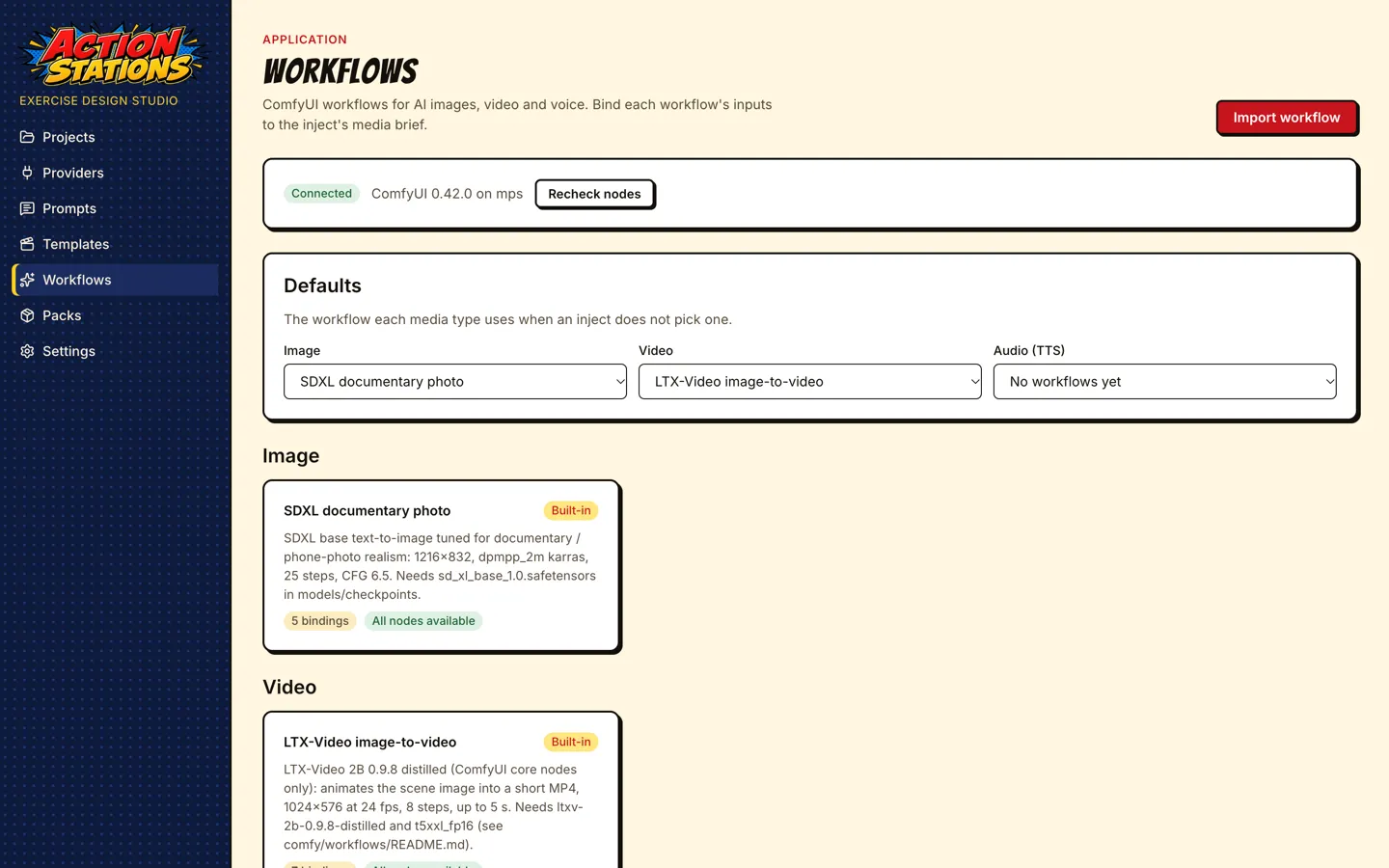
The Defaults row picks the workflow each media type uses when an inject does not name one (built in: image → sdxl-photo, video → image-to-video, no audio default).
Prompts that work with SDXL
Section titled “Prompts that work with SDXL”The media brief stage writes the image prompt; when you edit a brief or a prompt, keep these in mind:
- Describe things positively. SDXL ignores negation: “no screens” produces screens. Write “departure boards powered off and dark”.
- Dark screens: set Lighting. SDXL lights any screen it draws, even “powered off” ones. A brief that says the screens are dark or blank gets Lighting
screens-off(power on: the room stays lit andsdxl-photoswitches off the lit background screens and signs, leaving people untouched; the optional FLUX.2 [klein] edit above finds far more of them than the colour rule) ordark(a power loss: dim room). You can change it in the inject’s media brief. - Never rely on text in the image. Signs, screens and documents come out garbled. Text belongs in a template; a photo can sit inside a template’s image slot (see the template guide).
- Name the camera. “Phone photo”, “security camera still, high angle, timestamp overlay” or “press photo” changes the look more than adjectives do.
Your own workflows
Section titled “Your own workflows”Any workflow exported from ComfyUI with Workflow → Export (API) can be imported on the Workflows page (Import workflow, then choose the media type). You then bind the brief’s values (prompt, negative prompt, seed, width, height, duration, input image, voice text) to node inputs in the binding editor. Imported workflows go to the app’s data folder (global) or <project>/comfy/workflows/ (one project); a project workflow wins over a global one with the same id, which wins over one from an enabled pack, which wins over a built-in. Pack workflows (labelled Pack with the pack’s name) are read-only like the built-ins: edited bindings are saved in the app’s data folder (comfy/overrides/packs/<pack id>/) and Reset bindings to pack removes them, and installing a pack never changes the per-media defaults, though you can choose a pack workflow there. The first time a pack workflow renders media for a project, the workflow and the bindings in effect are copied into <project>/comfy/workflows/ and recorded in <project>/packs.json, so the project keeps rendering the same way after the pack is updated or uninstalled. With a project open, the Workflows page lists that project’s workflows too and saves their bindings in the project; when the installed pack has a newer version of a copied workflow, Update from pack replaces the copy (an edited copy asks first). The per-media defaults are app-wide and choose from the workflows outside any project. The binding format and sources are described in comfy/workflows/README.md.
Troubleshooting
Section titled “Troubleshooting”| Symptom | Fix |
|---|---|
| Detect says ComfyUI “Not found” | ComfyUI is not running, or listens elsewhere. Start it with --listen 127.0.0.1 --port 8188. |
| A workflow card lists missing nodes | Install the node pack that provides them (for imported workflows), restart ComfyUI, then Recheck nodes. |
| Render fails with a missing model / “value not in list” error | The model file is not in the folder the workflow expects (table above) or ComfyUI was not restarted after adding it. |
| Renders are very slow on a Mac | Check torch.backends.mps.is_available() is True; without MPS, ComfyUI runs on the CPU. |
| Video frames smear into colour after the first frame | A model that does not work on MPS (seen with Wan 2.2). Use the built-in LTX-Video workflow. |
| A screens-off image still shows small lit signs | Small far-off screens can stay lit with every option. Without the FLUX.2 [klein] edit far more stay lit: add its three files (above). |
Screens-off render fails in GrowMask (“can’t convert mps:0”) |
ComfyUI runs with --gpu-only and neither the FLUX.2 [klein] edit nor the sign detector is installed. Add one, or start ComfyUI without --gpu-only. |
| Images show garbled signs or screens | Expected for diffusion models. Describe screens as dark or off, and put text in a template. |