
Prompts
Every generation stage is driven by a prompt file you can read and change. This guide explains where prompts live, how overrides are layered, what a prompt file contains, which variables each stage provides, and how to change a prompt without breaking generation.
The stages and their prompts
Section titled “The stages and their prompts”A scenario is generated in stages. Each stage has one prompt file in prompts/ and asks the model for JSON that matches a fixed output schema.
| Prompt | Stage | Routed task | Produces |
|---|---|---|---|
ideate.md |
Give me ideas | ideate |
Scenario concepts with hooks, systems, cited sections, suggested roles. |
scenario_overview.md |
Overview | draft |
Title, theme, threat, operational impact, core plan sections tested. |
objectives_roles.md |
Objectives & roles | draft |
Exercise objectives and 4 to 5 player roles with standing orders. |
phase_plan.md |
Phase plan | draft |
Phases with titles, goals and time windows. |
msel_phase.md |
MSEL, once per phase | draft |
MSEL rows: time, inject id, from, to, event, expected action, purpose tag, format, citations. |
controller_handbook.md |
Controller handbook | draft |
Room setup, rules of play, SimCell scripts. |
rubric.md |
Rubric | draft |
Grading metrics with Fail / Pass / Excellence behaviours tied to injects. |
eeg.md |
Evaluation guides | draft |
FEMA Core Capabilities per objective; one EEG per capability with critical tasks, each citing one plan section. |
player_briefing.md |
Player briefing | draft |
Situation brief, team assignments, rules of engagement. |
hotwash.md |
Hot wash | draft |
“3-Up, 3-Down” and scenario-specific discussion questions. |
sitman.md |
SitMan modules | draft |
Situation Manual modules (narrative, key issues, discussion questions) and the assumptions and artificialities. The exercise details are never among its variables. |
critique.md |
Critique | critique |
Issues found in the draft; MSEL phases are then revised from them. |
inject_text.md |
Inject text | draft |
The full inject for one MSEL row, filling its template’s fields. |
inject_media_brief.md |
Media brief | draft |
Image, video or voice brief for one inject. |
The routed task decides which provider and model run the prompt (Providers → Routing). See Methodology for why the stages are ordered this way.
Layers: default, pack, global, project
Section titled “Layers: default, pack, global, project”A prompt can exist in four places. The most specific one wins, and it replaces the whole file (layers are not merged).
| Layer | Location | Edited on | Scope |
|---|---|---|---|
| Project | <project>/prompts/<name>.md |
Prompt overrides (project sidebar) | One project only. |
| Global | <userData>/prompts/<name>.md |
Prompts (application sidebar) | Every project on this computer. |
| Pack | prompts/<name>.md in a pack |
read-only | Projects in the pack’s domains. |
| Default | prompts/<name>.md in the app |
read-only | Shipped with the app. |
An enabled pack can replace a shipped prompt. Its version applies only to projects whose domain profile is one the pack lists in domains (matched by id or alias, and through the profile copy a project keeps of a pack domain); a pack that lists no domains applies to every project and to the application Prompts screen. The list and the editor name the pack (“Pack: Freight Rail Operations”). Disabling or uninstalling the pack brings back the default. Pack prompts are not copied into projects; the hash of the prompt text recorded with each output identifies what was used. Like every layer, pack prompts must use YAML frontmatter.
<userData> is the app’s data folder (Electron’s userData directory; tests and scripts can point it elsewhere with TTX_USER_DATA). Project overrides live inside the project folder, so they travel with it when you copy or version the project.
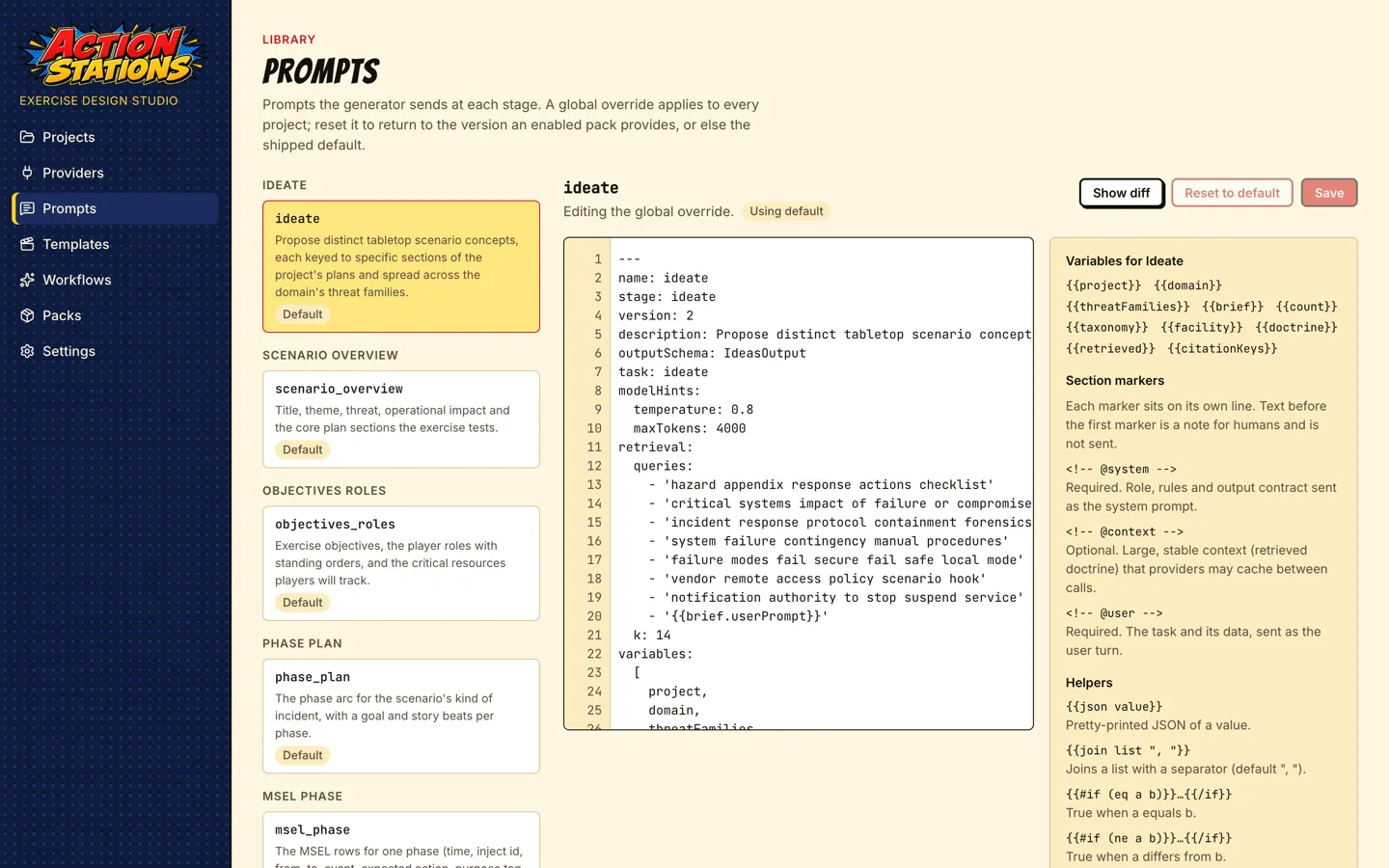
The editor shows which layer is in effect (“Using default”, “Override saved”), marks unsaved changes, and has:
- Show diff: your text against the layer below it.
- Save: validates and writes the override. Invalid files are not saved; the problems are listed with line numbers.
- Reset to …: deletes the override so the layer below takes effect again (global override, then a pack’s version, then the default).
- Discard changes: drops unsaved edits.
- A help panel listing the section markers and helpers.
Anatomy of a prompt file
Section titled “Anatomy of a prompt file”A prompt is Markdown with YAML frontmatter, split into sections by HTML-comment markers:
---name: hotwashstage: hotwashversion: 1description: Hot wash guide - 3-Up/3-Down plus scenario-specific discussion questions tied to the objectives.outputSchema: HotwashOutputtask: draftmodelHints:  temperature: 0.6  maxTokens: 2000retrieval:  queries:    - 'after action review lessons learned'    - '{{scenario.overview.threat}}'  k: 4variables: [project, scenario, roles, doctrine, retrieved, instructions]---
<!-- @system -->
You are a senior exercise facilitator writing the Hot Wash (debrief) guide ...
<!-- @context -->{{doctrine}}<!-- @user -->
<scenario_state>Scenario: {{scenario.title}}{{#if scenario.subtitle}} — {{scenario.subtitle}}{{/if}}Theme: {{scenario.overview.theme}}...
This is an excerpt of the shipped prompts/hotwash.md. Text before the first marker is a note for people and is never sent.
Frontmatter
Section titled “Frontmatter”| Key | Meaning |
|---|---|
name |
Must equal the file name without .md. |
stage |
The pipeline stage this prompt drives. |
version |
Positive integer; recorded with the prompt hash in each stage run’s provenance. |
outputSchema |
Name of the JSON schema the answer must match. Editing the prompt cannot change the output shape. |
task |
ideate, draft or critique: which routing row picks the provider and model. |
modelHints |
temperature and maxTokens sent with the request. |
retrieval |
queries (Handlebars templates, rendered with the stage’s variables) and k, how many document sections to retrieve. |
variables |
Documentation: the variables this stage provides. It is not enforced. |
Section markers
Section titled “Section markers”| Marker | Required | Sent as |
|---|---|---|
<!-- @system --> |
yes | The system prompt: role, rules and output contract. |
<!-- @context --> |
no | Large, stable context (usually {{doctrine}}). Providers that support it cache it between calls. |
<!-- @user --> |
yes | The task and its data. |
Each marker sits on its own line, appears once, and its section must not be empty.
Template language
Section titled “Template language”Section text and retrieval queries are Handlebars templates rendered as plain text (no HTML escaping). Built-in blocks work: {{#if}}, {{#unless}}, {{#each}} (with @index), {{#with}}, {{lookup}}. Only these helpers are allowed; an unknown helper is rejected when you save:
| Helper | Example | Result |
|---|---|---|
json |
{{json scenario.overview}} |
Pretty-printed JSON. |
join |
{{join citationKeys ", "}} |
Joins a list (default separator ", "). |
eq, ne |
{{#if (eq phase.number 1)}} |
Equality tests. |
and, or, not |
{{#if (and mixPass mixGaps)}} |
Boolean logic. |
inc |
{{inc @index}} |
Adds one (1-based numbering). |
upper, lower |
{{upper project.orgType}} |
Case conversion. |
default |
{{default brief.audience "all staff"}} |
Fallback for a missing value, empty text or empty list. |
bullets |
{{bullets brief.learningObjectives}} |
Markdown - list, one item per line. |
indent |
{{indent (json scenario.overview) 2}} |
Indents every non-empty line by n spaces. |
A variable that does not exist renders as empty text; it does not raise an error. Check spelling against the tables below.
Variables
Section titled “Variables”Available to every scenario stage
Section titled “Available to every scenario stage”| Variable | Contents |
|---|---|
project |
name, orgName, orgType, city, region, aliases (brand aliases), documents[] (title, shortName, kind). |
brief |
The scenario brief: userPrompt, audience, durationHours, phaseCount, learningObjectives[], constraints[], startWallClock. |
startWallClock, durationHours, phaseCount |
Shortcuts into the brief (start clock defaults when not given). |
idea |
The chosen idea (title, hook, threat, systems, cited sections) when the scenario was developed from one. |
scenario |
The scenario so far: title, subtitle, overview, objectives[], roles[], phases[] (number, title, goal, startTime, endTime), msel[], rowCount, criticalResources, rubric, hotwash, simcellScripts, warnings[]. |
roles |
Player roles: key, name, abbreviation, team, description, standingOrders[]. Use key in MSEL to fields. |
phases |
Same as scenario.phases. |
taxonomy |
purposeTags[] (tag, label, meaning) and injectTypes[] (id, label, category, delivery) — the project’s domain’s types, its preferred ones first. |
domain |
The project’s domain profile: id, label, description, vocabulary (facility, public, frontline, operationsCenter), systems (it[], ot[]), roles[], outsideParties[], mediaChannels[], injectTypes[], noiseExamples[], pressureExamples[], factCategories[], threatFamilies[]. |
threat |
The scenario’s threat family: id, label, description, phaseArc[] (number, title, goal, beats[]), decisionPointExamples[], clueKinds, hurdleKinds, keyCoordination, technicalClue, clueRole, decisionMustMention. |
doctrine |
The retrieved document sections as a <documents> block, each <document key="C1" source="TIRP" section="13.6 …">. |
retrieved |
The same sections as a list: key, documentTitle, headingPath, page, text. |
citationKeys |
The keys in this prompt’s <documents> (C1, C2, …). The model cites by key; the app resolves keys to sections. |
instructions |
Extra instructions typed into the Re-run dialog; empty otherwise. |
Extra variables per stage
Section titled “Extra variables per stage”| Stage | Variables |
|---|---|
ideate |
count (how many ideas) and threatFamilies[] (the domain’s families, each shaped like threat). Ideation runs before a scenario exists, so it has project, domain, brief, facility, taxonomy, doctrine, retrieved, citationKeys only. |
msel_phase |
phase (the phase being written, with isDecisionPhase), priorRows, lockedRows, nextInjectNumber, dpPhase, hasDecisionPoint, targetRowCount, maxRowCount; on later passes mixPass + mixGaps (missing purpose tags) and revisePass + reviseNotes (critique findings). |
eeg |
capabilities[]: the 32 Core Capabilities (id, name, areas, definition), the domain profile’s preferred ones first; objectives[] (name, text). The stage refuses to run when retrieval finds no plan section: every critical task must cite one, and a task whose key does not resolve is dropped. |
critique |
lints: the deterministic lint findings the critique should take into account; tagGuide: each purpose tag in use with its meaning and whether its content is intentionally false (PRESSURE, NOISE, RED_HERRING, MISINFORMATION, DISTRACTION). |
inject_text |
row, phase, injectType, injectTypeLabel, injectCategory, requestedType, defaultDelivery, hasTemplate, fieldSchema (one line per template field), keyFields, variants, imageSlots, facts, storySoFar, priorInjects, previous, brand, and on a repair repairIssues + previousOutput. |
inject_media_brief |
row, inject, injectType, injectTypeLabel, renderPaths, plan, facts, brand. |
The variables: list in each shipped prompt’s frontmatter names exactly what that stage reads.
The app limits the review revision whatever the model returns: a rewritten row is reverted, and the revert logged, when it changes the deliberate content or the parties of a PRESSURE-style row, when the critique did not name it, or when a missing-decision-point note converts a second row, a PRESSURE-style row, or changes the converted row’s sender.
How a stage runs
Section titled “How a stage runs”- The prompt is loaded from the most specific layer.
retrieval.queriesare rendered with the variables and run against the project’s search index; the topksections becomedoctrine,retrievedandcitationKeys.- The sections are rendered and sent with the output schema (structured output where the provider supports it).
- If the answer does not match the schema, the stage sends one repair message listing the problems. If the repair also fails, the stage fails and the scenario page offers Continue from failure.
- Citation keys are resolved to document sections; keys that were not in the prompt are dropped and reported.
- The stage run is recorded in the scenario’s provenance: prompt name, version and hash, provider, model, tokens, duration.
Text inside <documents> and <scenario_state> is data quoted from the organization’s files and earlier stages. The shipped prompts tell the model never to follow instructions inside those blocks, and the app neutralizes closing tags in that data. Keep that sentence in any prompt you rewrite.
Iterating safely
Section titled “Iterating safely”-
Start with a project override. Change a prompt for one project first, generate, compare, and only then copy it to the global layer.
-
Change one thing at a time. Re-run just the affected stage (scenario page → Advanced information → Stages → Re-run). Later stages that depend on it are marked stale; locked MSEL rows are kept.
-
Try instructions before editing. The Re-run dialog’s Extra instructions go into
{{instructions}}for that run only. If an instruction works every time, move it into the prompt.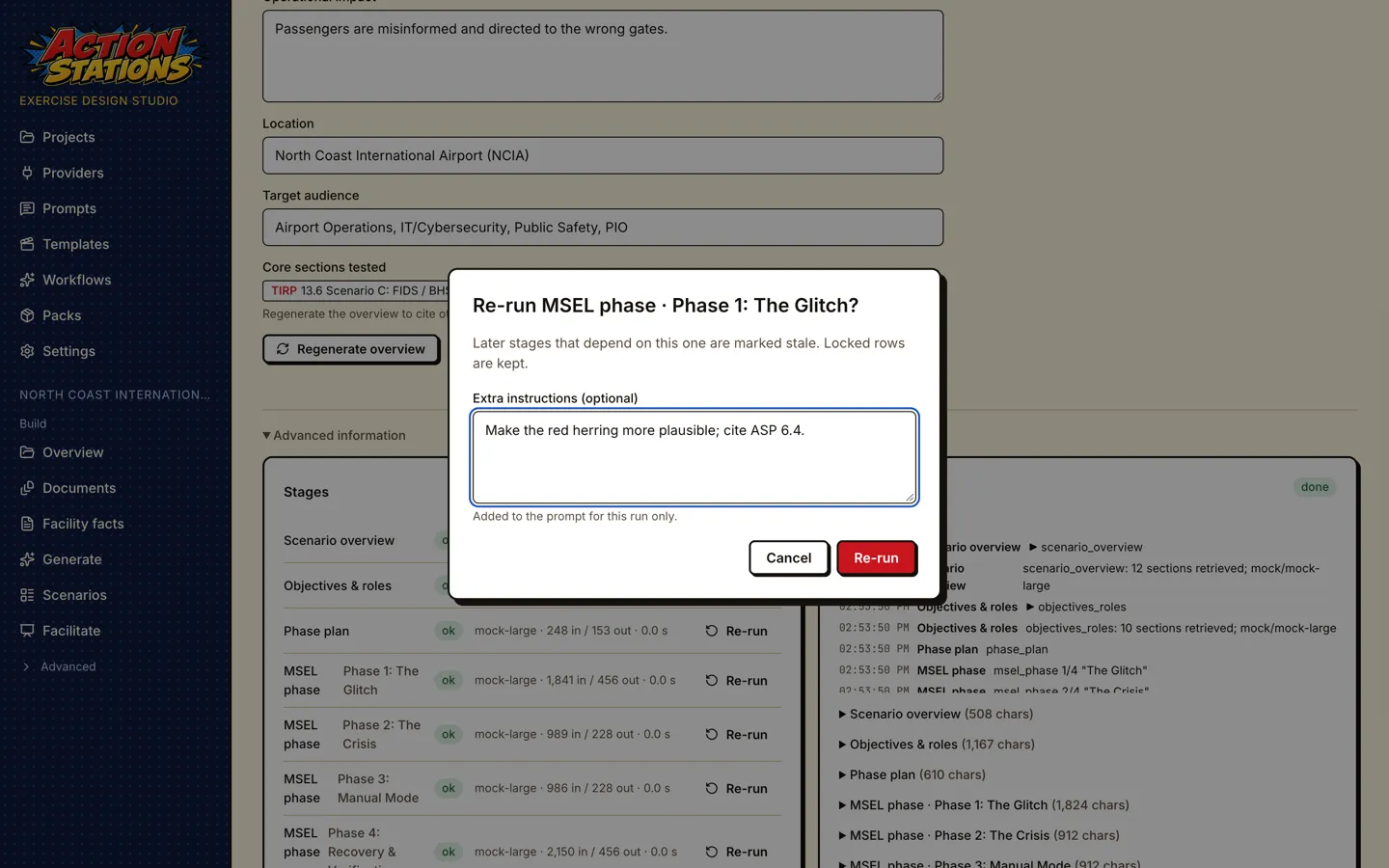
-
Keep the output contract. The JSON field names in the system section must match the stage’s output schema. Edit the guidance around them, not the names.
-
Keep the citation rules. Every scenario stage tells the model to cite only keys present in
<documents>and to write section numbers in prose. Removing that produces invented citations. -
Tune retrieval. If a stage misses a plan section, add a query that uses the plan’s own words to
retrieval.queries, or raisek. Use the project’s Search index page to test a query first. -
Watch the Warnings tab. Deterministic lints (missing purpose tags in a phase such as
MIX_NO_PIO_PRESSURE,ROLE_NO_INJECT,RUBRIC_LINK_UNKNOWN) and critique findings are listed there after each run. -
Use the diff. Show diff before saving, and Reset to … to return to the shipped prompt.
-
Small local models follow long prompts less reliably. Keep added rules short and concrete, and prefer examples over prohibitions (for example “describe the screens as powered off and dark” rather than “no screens”).