
Anthropic (Claude)
The Anthropic provider sends generation requests to Claude models through the Anthropic Messages API. It is the only provider in this list that leaves your computer: prompts, retrieved excerpts of your documents and the scenario so far are sent to Anthropic for every stage routed to it. Use project routing to keep sensitive projects on local models. Before anything is sent, the app shows the request and asks for your approval, and it replaces names, phone numbers, emails and addresses with placeholders by default: see What goes to cloud models.
1. Get an API key
Section titled “1. Get an API key”Create a key in the Anthropic Console under API keys. Usage is billed per token to that account.
2. Add the provider
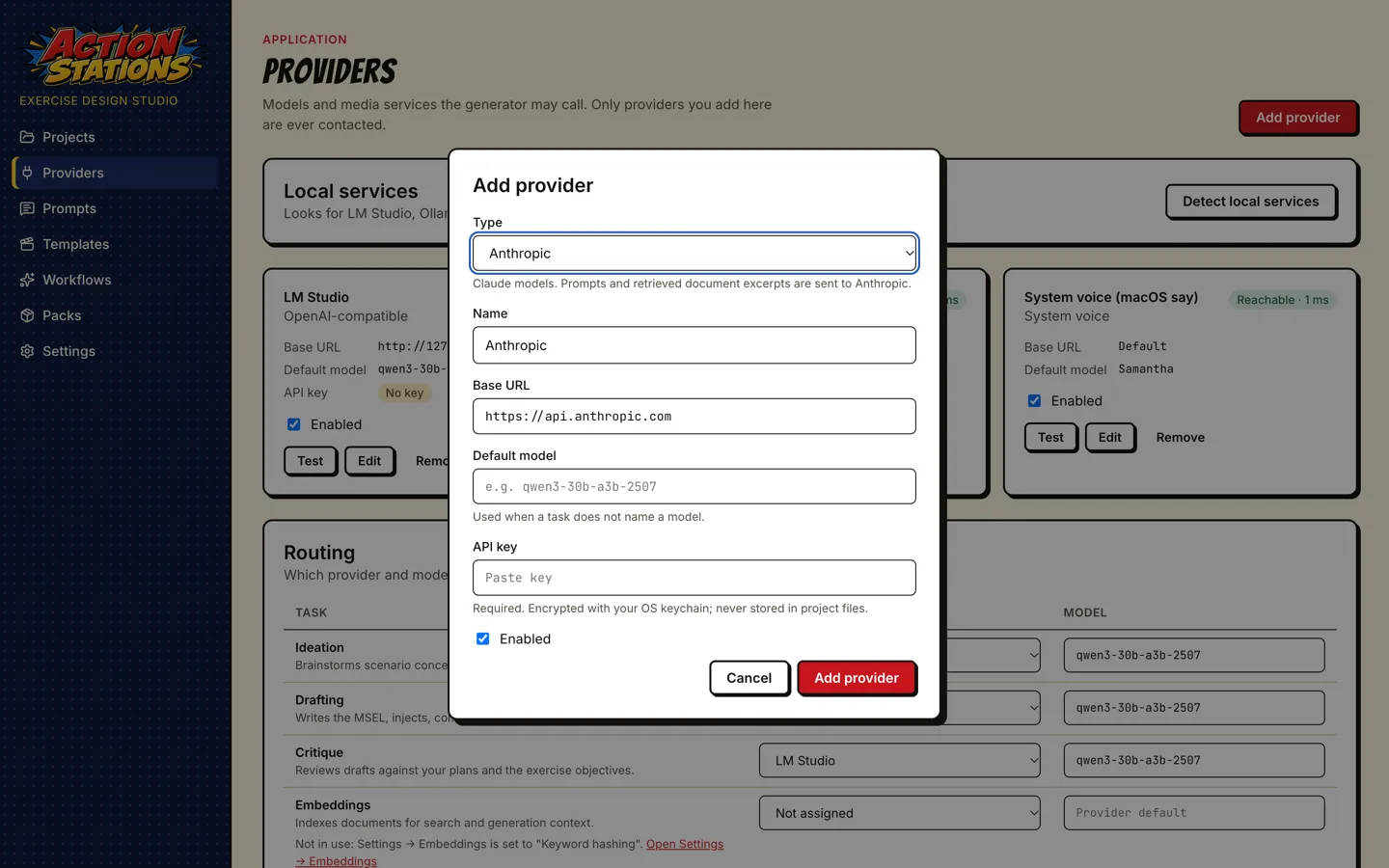
Section titled “2. Add the provider”- Providers → Add provider → Type: Anthropic. The base URL is fixed to
https://api.anthropic.com. - Paste the key into API key. Leave Default model empty to use the app’s default (
claude-opus-5-5), or enter a model id such asclaude-sonnet-5-5orclaude-haiku-5-5. - Add provider, then Test on the card.
- In Routing, assign the tasks you want Claude to run.
How the key is stored
Section titled “How the key is stored”- The key is encrypted with the operating system’s keychain (Electron
safeStorage) and written as ciphertext tosecrets.jsonin the app’s data folder, with owner-only permissions. - It is never written to
settings.json, to a project folder, or to any log, and it is never sent to the app window: after saving, the form only shows that a key is set, with Replace and Remove. - If the operating system cannot encrypt (for example Linux without a keyring, where Electron falls back to plain text), the app refuses to store the key.
- Removing the provider removes its key.
Every Claude call is metered in provider-calls.jsonl in the app’s data folder: model, input, output and cache tokens, duration, and an estimated cost from list prices built into the app (as of 2026-10-06; prices change, so treat the figure as an estimate, not a bill). The retrieved document context is sent as a cacheable block, so repeated calls within a few minutes are billed at the cache-read rate.
For scale: the reference scenario generated on a local model used about 127,000 input and 21,500 output tokens across its stages (ideation and inject generation not included). At the built-in list prices that volume is roughly:
| Model | Input / output per million tokens | One scenario (estimate, before caching) |
|---|---|---|
claude-opus-5-5 |
$4 / $20 | about $0.95 |
claude-sonnet-5-5 |
$2 / $10 | about $0.47 |
claude-haiku-5-5 |
$0.10 / $0.50 | about $0.02 |
Claude’s tokenizer counts differently from the local model’s, re-running stages adds to the total, and inject generation adds one call per inject. Check provider-calls.jsonl after a run for the real figures.
A cost-conscious setup: local models for ideation and drafting, Claude for critique only (one call per scenario plus the MSEL revisions).
Options
Section titled “Options”Set in the provider’s options in settings.json (see Advanced provider options): effort (default high), maxTokens, timeoutMs, anthropicVersion, and fallbacks (false disables server-side model fallbacks).
Troubleshooting
Section titled “Troubleshooting”| Symptom | Fix |
|---|---|
| Test fails with an authentication error | The key is wrong or revoked. Edit → Replace the key. |
| “The OS cannot encrypt” / key not saved | No usable keychain (common on minimal Linux). Install and unlock a keyring (GNOME Keyring or KWallet), restart the app. |
| Rate-limit or overloaded errors | The app retries transient errors. If they persist, route fewer tasks to Claude or wait. |
| Cost figure missing in the call log | The model id is not in the built-in price list; the call still works. |