
Providers and routing
A provider is a model or media service the app may call: a local LLM server, a cloud API, ComfyUI, or a local text-to-speech server. The app never contacts a provider you have not added, and nothing leaves your computer unless you add a remote one (Anthropic, ElevenLabs, or an OpenAI-compatible server on another machine).
| Guide | Provider type in the app | Used for | Runs on |
|---|---|---|---|
| LM Studio | OpenAI-compatible | Ideation, drafting, critique, embeddings | macOS, Windows, Linux |
| Ollama | Ollama | Ideation, drafting, critique, embeddings | macOS, Windows, Linux |
| Anthropic | Anthropic | Ideation, drafting, critique | Cloud (API key, paid per token) |
| ComfyUI | ComfyUI | Scene photos, short video clips, optional TTS | macOS (MPS), Windows/Linux (CUDA) |
| fal.ai | fal.ai | Scene images, short video clips | Cloud (API key, paid per call) |
| ElevenLabs | ElevenLabs | Voice: radio calls, voicemails, PA | Cloud (API key, paid per credit) |
| Replicate | Replicate | Scene images, short video clips | Cloud (API token, paid per call) |
| Local TTS | OpenAI-compatible | Voice: radio calls, voicemails, PA | Apple Silicon (mlx-audio) |
| System voice | System voice | Offline voice fallback | macOS, Windows, Linux (espeak-ng) |
You need at least one text provider to generate scenarios. Everything else is optional: importing and searching documents works with no provider at all.
Adding a provider
Section titled “Adding a provider”Open Providers in the sidebar.
- Detect local services probes LM Studio (
127.0.0.1:1234), Ollama (127.0.0.1:11434) and ComfyUI (127.0.0.1:8188, then ComfyUI Desktop’s127.0.0.1:8000) on this computer only, with an 800 ms budget each, checks whether the operating system has a voice engine (System voice), and offers Add for each one it finds. - Add provider opens a form: Type (LM Studio, Ollama, Anthropic, OpenAI-compatible, ComfyUI, fal.ai, Replicate, ElevenLabs, System voice), Name, Base URL (none for the system voice), Default model (Default voice for the system voice), API key (Anthropic, fal.ai, ElevenLabs and OpenAI-compatible only) and Enabled.
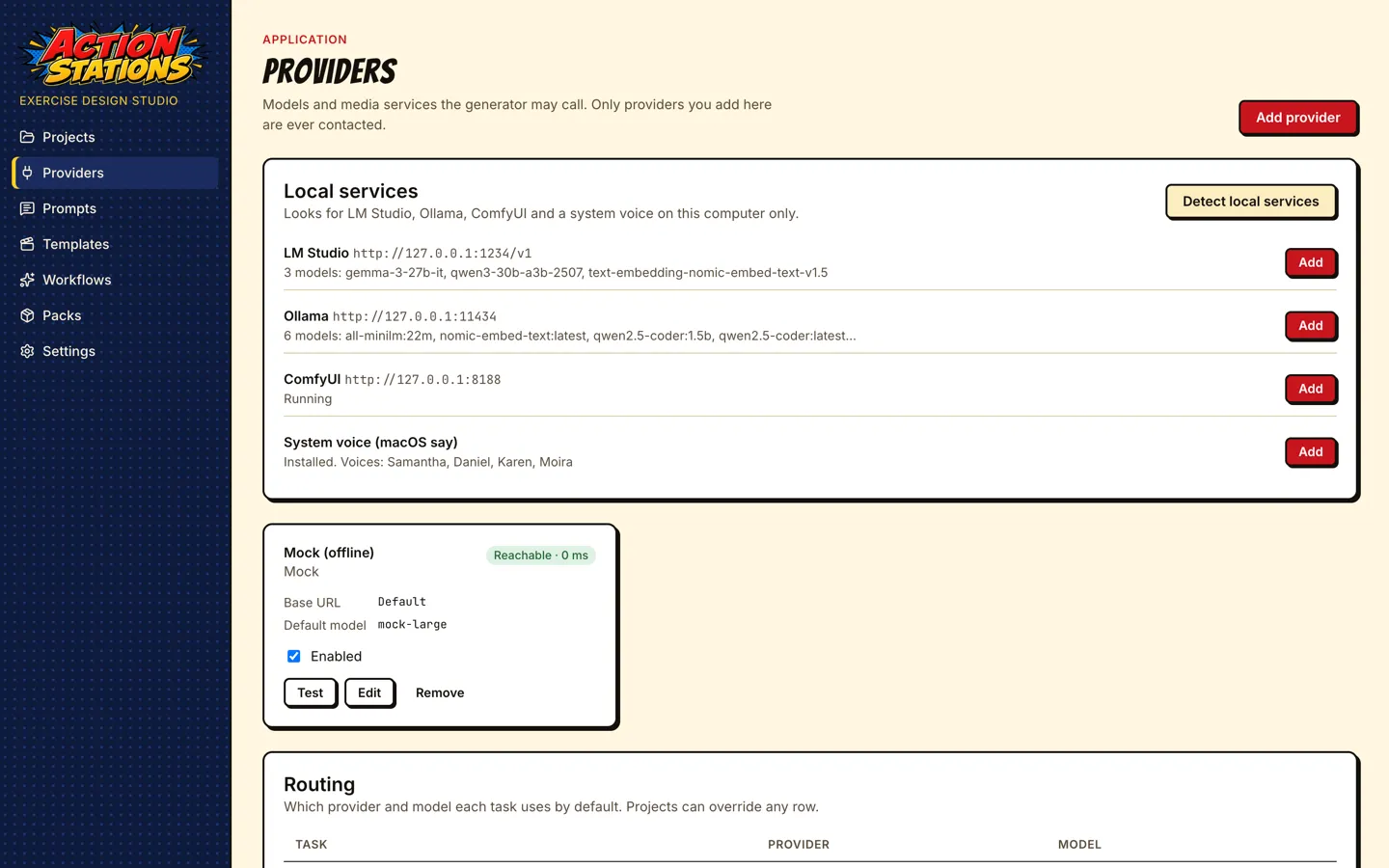
Each provider card shows its reachability and latency, and has Test (a one-line chat request for text providers), Edit and Remove.
Local tools setup
Section titled “Local tools setup”Settings → Local tools (and the setup wizard’s Where models run step) asks how models run: Cloud APIs only, Local tools or A mix. Cloud APIs only shows no tool rows and never detects, downloads or installs anything. For local tools, each tool is its own row with what it does, its download and disk size, its license, and its state:
- Detected: installed and answering on
127.0.0.1(ComfyUI Desktop on port 8000 is found too). - Installed, not running: found on disk, with Start where the app can start it. LM Studio starts with
lms server start, Ollama and ComfyUI Desktop by opening their app (on Linux, Ollama withollama serveon 127.0.0.1, which the row can Stop again and the app stops when it quits), and the voice server withmlx_audio.server --host 127.0.0.1 --port 8765. - Not installed: Download and install, Open the download page, or Skip. Skip is remembered and can be undone with Show skipped tools.
Download and install runs as a job with progress and Cancel:
- It fetches the vendor’s latest installer from its official host only. Every redirect must stay on the vendor’s https hosts.
- It checks the vendor’s sha256 where one is published (Ollama).
- It verifies the publisher signature before anything runs. On macOS that is the pinned Developer ID Team ID plus Gatekeeper; on Windows, the pinned Authenticode signer.
- On macOS it copies the app out of the disk image into Applications. On Windows it opens the installer, and Windows asks for administrator rights itself if the installer needs them.
Ollama on Linux installs without sudo. A system-wide Ollama (/usr/local/bin, /usr/bin) is detected first and used as it is. Otherwise Download and install fetches the release tarball for x64 or arm64. It requires the sha256 Ollama publishes in sha256sum.txt, which must match GitHub’s digest; Ollama does not sign its Linux builds, so this checksum is the only check. The tarball is unpacked into ~/.local/share/actionstations/tools/ollama (under $XDG_DATA_HOME when that is set). The main build already includes NVIDIA CUDA support. When the app finds an AMD GPU driver (/dev/kfd) or an NVIDIA Jetson, the row also offers the ROCm or JetPack add-on, ticked. To remove it, stop Ollama and delete that folder.
The app never elevates silently and never downloads in the background. For LM Studio and ComfyUI on Linux, and for the mlx-audio voice server, only the download page or the exact command is offered: there is nothing signed or checksummed to verify.
Recommended models follow the tools. They are chosen for this computer’s memory: 70 % of RAM on Apple Silicon, VRAM on an NVIDIA GPU, otherwise half of RAM on the CPU. You get a text model per tool (from qwen3.5:4b up to gpt-oss:120b), nomic-embed-text for Ollama, SDXL and LTX-Video for ComfyUI’s default workflows, and, with 32 GB or more, the optional FLUX.2 [klein] 4B files that switch off screens in blank-screen scenes (ComfyUI guide). Each has its size and license and is its own Download. Downloads go through the tool’s own pull: Ollama’s pull API, lms get, or a sha256-checked file in the matching model folder of the running ComfyUI.
Routing
Section titled “Routing”The Routing table decides which provider and model each task uses:
| Task | What it does | Provider types offered |
|---|---|---|
| Ideation | “Give me ideas”: scenario concepts from your documents. | Anthropic, OpenAI-compatible, Ollama |
| Drafting | Overview, roles, phases, MSEL, handbook, rubric, briefing, hot wash, injects. | Anthropic, OpenAI-compatible, Ollama |
| Critique | Reviews the draft; the MSEL is then revised from the findings. | Anthropic, OpenAI-compatible, Ollama |
| Embeddings | Document embeddings when Settings → Embeddings is “Configured provider”. | OpenAI-compatible, Ollama |
| Image | Photographic scene images (text-bearing media always use templates). | ComfyUI, OpenAI or Gemini (OpenAI, Gemini) |
| Video | Short clips animated from a scene image. | ComfyUI |
| Audio | Voice lines for radio calls, voicemails and PA announcements. | OpenAI-compatible (Local TTS), System voice, ComfyUI |
The Model column overrides the provider’s default model for that task; leave it empty to use the default. A common setup is a strong model for drafting and critique and a faster one for ideation, or a cloud model only for critique.
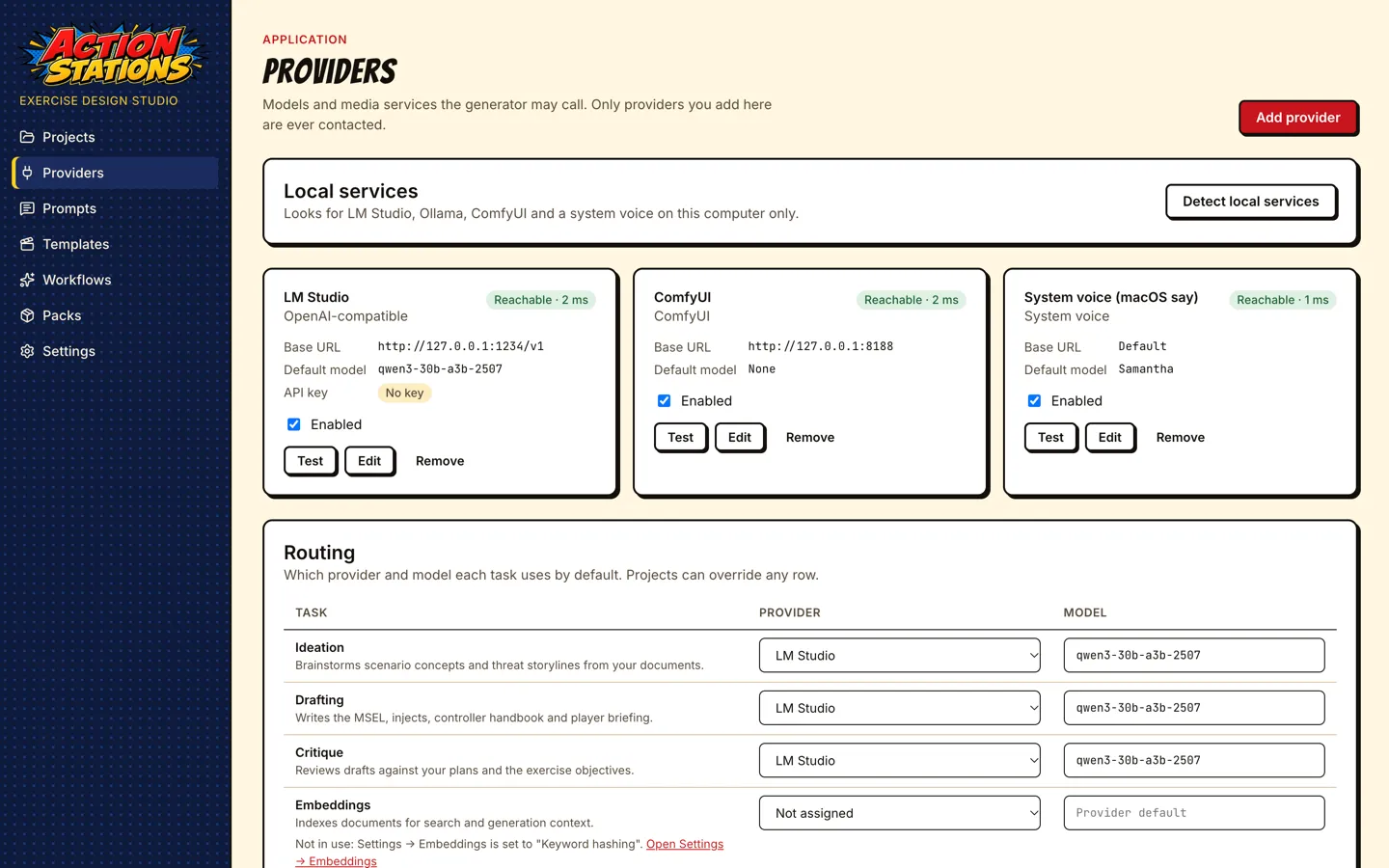
Project routing. Each project has its own Provider routing page (project sidebar). A task set there overrides the global row for that project only; tasks left unassigned fall back to the global routing. Use it to keep one sensitive project on local models while others use a cloud model.
What each prompt uses. Every prompt file names its task (task: ideate | draft | critique); see Prompts.
Embeddings
Section titled “Embeddings”Search and retrieval for generation use embeddings, chosen under Settings → Embeddings:
| Mode | Status in this build |
|---|---|
| Keyword hashing (default) | Works offline, no download, about half a second to index the six NCIA reference documents. Use this. |
| Local model (on this computer) | Better on paraphrase. The model (Xenova/bge-small-en-v1.5, 133 MB) is downloaded once by the setup wizard’s Search quality step (Settings → Run setup again); choosing this mode in Settings alone does not download it, and Documents then shows “Not ready” (#114). |
| Configured provider | Uses the provider and model on the Embeddings row of Providers → Routing (a project’s own routing overrides it). Tested with LM Studio text-embedding-nomic-embed-text-v1.5 and Ollama nomic-embed-text (768 dimensions each). The Embeddings row shows whether this mode is active and links to Settings. |
After changing the mode or the Embeddings routing, press Rebuild index on the project’s Documents page. When the new embedder has different dimensions (384 for keyword hashing, 768 for nomic-embed-text), the stored vectors are dropped and rebuilt.
Where settings and keys are stored
Section titled “Where settings and keys are stored”- Providers, routing and other preferences:
settings.jsonin the app’s data folder (Electron’suserData), never in project folders. - API keys: encrypted with the operating system’s keychain through Electron
safeStorageintosecrets.jsonin the same folder (ciphertext only, owner-only permissions). Keys are never written tosettings.json, project folders or logs, and never sent to the window. If the OS cannot encrypt (for example Linux without a keyring), the app refuses to store keys. - Metering: one line per call in
provider-calls.jsonl(model, tokens, duration, estimated cost for Anthropic). Never prompt text, never keys.
Advanced provider options
Section titled “Advanced provider options”A few per-provider options have no form field yet. Quit the app, edit the provider’s options object in settings.json, and start the app again:
| Option | Providers | Meaning |
|---|---|---|
timeoutMs, maxTokens |
all | Request timeout and output cap. |
jsonMode |
OpenAI-compatible | Force json_schema, json_object or prompt structured output (default: negotiated, best first). |
headers |
OpenAI-compatible | Extra request headers (not secrets; use the API key field for those). |
inputUsdPerMTok, outputUsdPerMTok |
OpenAI-compatible | Prices for the cost estimate in the call log. |
embeddingDims |
OpenAI-compatible, Ollama | Embedding size when the server does not report it. |
ttsModel, voice, voices, speakerGapSec |
OpenAI-compatible | Text-to-speech model, default voice, per-speaker voices, gap between speakers. |
engine, voice, voices, speakerGapSec |
System voice | Speech engine to force, default voice, per-speaker voices, gap between speakers. |
numCtx |
Ollama | Context window sent as num_ctx. |
seed |
OpenAI-compatible, Ollama | Fixed sampling seed (an integer) for repeatable output, as the model benchmark uses. |
anthropicVersion, effort, fallbacks |
Anthropic | API version header, effort level (default high), server-side model fallbacks. |
Offline development
Section titled “Offline development”Launch with TTX_MOCK_PROVIDERS=1 to add a built-in mock provider and route every task to it when routing is empty. It returns schema-valid output instantly.
General troubleshooting
Section titled “General troubleshooting”| Symptom | Cause and fix |
|---|---|
| Detect local services says “Not found” | The service is not running, or listens on a different port or interface. Start it, or add it by hand with Add provider. |
| Generate shows “No text model is set up for generation” | Route Ideation, Drafting and Critique to an enabled provider. The same banner also appears when the embedder fails (see the message after it). |
| A stage fails with “Output did not match … after 1 repair attempt(s)” | The model could not produce valid JSON for that stage. Use a stronger model for Drafting, raise the context length, then Continue from failure on the scenario page. |
| A stage fails on a long prompt or the output stops mid-JSON | The model’s context window is too small. MSEL phases send up to about 30,000 input tokens; load models with at least 32K context. |
| Provider card shows an error after an upgrade | Edit the provider and check the base URL, then Test. |